SEO Experts In Pakistan and why you have to hire them?

Blog SEO Pakistan
Why you need SEO expert for your website or Blogs? have you ever thought about your website/blog have internet presence in major search engines where people can search about your business or brand? like Google, Yahoo, Bing and you should have such a instructor or Guidant who track, trace and make strategies about how can your blog website perform well in top search engines results.

SEO in Pakistan provide professional SEO services to their clients to deliver a premium results with white hat SEO techniques by writing articles, link building, On-Page SEO, Off-Page SEO, Visitor tracking and many other ethical ways to improve your websites visitors as well as internet presence.

Benefits of SEO Pakistan

If you are running an online business then SEO is main key term for the success or frailer of sales. People use search engines like Google, Yahoo to search their required things and search engines provide results. Basically SEO is the name of that professional technique which is use to boost your websites ranking on particular keyword or phrase. More you will optimize your content and keywords more you will get visitors.

Benefits of SEO In Pakistan


  • SEO gives more visitors to your website for a specific keyword(s)
  • SEO pump your website on top results in search engines
  • Search Engine Optimization add customer trust and professionalism to your brand
  • SEO provide your business more success and visibility
  • It boost your sales as compared before
  • Best SEO always kick other competitors and make your website top ranked

Contact me for SEO Services of your blog for only 1000 rupees Pakistani
You will give me your template and I'll fully optimize it for SEO to get better SEO and google search ranking.

Add Blog URL to Google Search Engine

Submit URL to Google
In today's post I will teach you how to submit your new blog URL to Google, Bing, Ask and Yahoo for free and get high traffic to your blog from these search engine submissions. When you add your blog URL, Search Engines will index your blog and enter or show in their search engine results page (SERP).

How to Submit Blog URL in Search Engines


Add URL to Google

Follow these steps to add your blog url in google search engine results for free.

Step 1.  Go to the following link: http://www.google.com/addurl/?continue=/addurl
Step 2.  Type in your URL, example: http://www.yoursite.com
Step 3.  Enter the captcha text shown in the box.
Step 4.  Now click Submit Request


Add URL to Bing and Yahoo

Follow these steps to add your blog url in Yahoo and Bing search engine results for free. 
Note: Bing and Yahoo are same search engines.

Step 1.  Go to the following link: http://www.bing.com/docs/submit.aspx
Step 2.  Type in your URL, example: http://www.yoursite.com
Step 3.  Enter the captcha text shown in the box.
Step 4.  Now click Submit

When you complete the above steps, submit your blog only once, after some days your blog will show in searches. Because it takes time for the search engines to index your pages. If you submit more than once, some search engines may consider this spamming which could result in not indexing your blog site at all.

Incoming search for:
google add url
add url to google
add url to google com
add url on google
add google url
google url add
add url google
add to google url
add a url to google
add my url to google
how to add url in google search for free

Enable Custom robots header tags for blogger SEO Traffic

enable Custom robots header tags in blogger
Blogger has recently introduced search preferences tab in Blogger and continually introducing new features in it to help fellow bloggers do better SEO of their blogs. This will help bloggers to increase your blogs traffic and get better google search results rankings.
One of the new features introduced by blogger's developers is Custom Robots Header Tags.This tool plays great role in our blog's Search Engine Optimization. Using it properly helps us to gain more visitors from search engines and hence our blog page views will also increase.
Also the search engine will not accept the duplicate content form your site so you can avoid your site duplicate content with the custom robots header tags settings.

What are Custom Robots Header Tags ?


These are all the header tags used in blogger and their usage/meaning is defined below.

all:  There are no restrictions for indexing or serving. This is default for all pages
noindex:  Do not show this page in search results and do not show a "Cached" link in search results.
nofollow:  Do not follow the links on this page
none:  Equivalent to noindex, nofollow
noarchive:  Do not show a "Cached" link in search results.
nosnippet:  Do not show a snippet in the search results for this page
noodp:  Do not use metadata from the Open Directory project (DMOZ) for titles or snippets shown for this page.
notranslate:  Do not offer translation of this page in other languages in search results.
noimageindex:  Do not index images on this page.
unavailable_after: [RFC-850 date/time]: Do not show this page in search results after the specified date/time. The date/time must be specified in the RFC 850 format. Example: 17 May 2012 15:00:00 PST

How to Enable Custom robots header tags in Blogger SEO

Follow these steps to enable Custom robots header tags in Blogger Blogs to increase your blog traffic and page views.

Step 1.  Log in to your blogger account Dashboard and click on your blog.
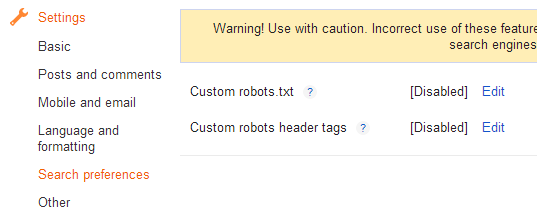
Step 2.  Go to Settings >> Search Preferences.
Step 3.  
Click on edit link in front of Custom Robots Header Tags and then click on Yes option.
Step 4. 
Once you click on the Yes you will see many options. Simply tick on the options as shown in the below image.
Best Custom robots header tags for blogger SEO Traffic

Step 5.  Now click on "Save changes" button and You are done!

That's all! If you have any doubt or need help about this post, please leave comment.

Custom Robots.txt file for Blogger/Blogspot blogs for SEO

Custom Robots.txt for blogger
Today I will show you How to Enable Custom Robot.txt File in Blogger for better SEO and search engine results?

Blogger now lets you edit your blog's robots.txt file. What are Robots.txt files, robots files are plain text files which instruct the search engines what to not index. Robot.txt is a way to tell search engines whether they are allow to index a page in the search result or not. The bots are automatic, and before they could access your site, they check the Robot.txt file to make sure whether they are allowed to crawl this page or not.

How to Enable Custom Robots.txt in Blogger


1. Blogger Dashboard >> Select Blog >> Select Settings tab >> Search Preferences

Robots.txt

2. Click on Edit in front of Custom robots.txt
3. Click on Yes and proceed to next step.
3. Next a box comes up and paste following given code.

User-agent: Mediapartners-Google
Disallow:

User-agent: *
Disallow: /search
Allow: /
Sitemap: http://YOURBLOGURL.blogspot.com/feeds/posts/default?orderby=UPDATED
4. and finally click on Save Changes button to save code.

I hope this tip would help you. If you are having any issue regarding crawling then, feel free to leave your questions in the comments below and I would try to help you in solving them.

How to remove Blogger Navigation Bar?

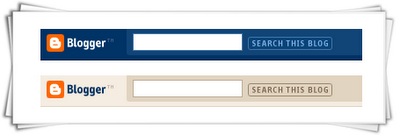
Blogger Navigation Bar

In every blog there is a blogger default navigation bar (nav bar) of the above style. This nav bar make your blog look less professional. These navigation bars can be removed using a simple CSS one line code.

Also read: Remove Subscribe to: Posts (Atom) Link on Blogger

Removing Blogger Deafult Nav Bar


Apply these steps to remove the Blogger Navigation bar / Blogger Nav Bar.
Steps:

  • Log-in to your blog
  • Template >> HTML >> Proceed
  • Search For this code  ]]></b:skin>   (tip: Use CTRL+F)
  • Now Just above/before  ]]></b:skin>   insert following code

#navbar-iframe,#navbar { display: none !important; }

Save your template and view your blog. Blogger Navigation Bar will no longer be there.

Add SEO Meta Tags (Title and Description) in Blogger

SEO Meta Tags:

SEO Meta Tags:


Meta tags is a important things for SEO (Search Engine Optimization). The <meta> tag provides metadata about the HTML document. Meta tags will not be displayed on the page, but will be machine parsable. Meta elements are typically used to specify page description, keywords, author of the document, last modified, and other metadata. The metadata can be used by browsers (how to display content or reload page), search engines (keywords), or other web services. Google bots read meta tags of a site or blog and give these tags (title,keywords and description) information to google search engine, according to these tags your blog is showed in google search engine results pages (SERP's).

Meta Tags are most important and most useful for our blog's SEO. Also see updated post on Meta Tags

Put SEO Meta Tags in Blogger Template

Learn how to put Meta Tags in blogger template for better ranking in search engine results with easy steps.


Step 1.
Login to Blogger >> Go to Dashboard >> Template >> Edit Html

Step 2.
Find the following code [Tip: Ctrl+F]
<head>
This will be mostly on the main page of the template coding.


Step 3.
After/under this line paste the following code.
           <!-- Meta Tags ~  blogtipsuk.com  -->
 <meta content='Your Blog Description' name='description'/>
 <meta content='Keyword1,Keyword2,Keyword3' name='keywords'/>
 <meta content='Author Name' name='Author'/>
 <meta content='Author Email Address' name='Email'/>
 <meta content='all' name='robots'/>
 <meta content='index, follow' name='robots'/>
 <meta content='Language Name' name='language'/>
 <meta content='Country Name' name='country'/>
 <meta content='blogger' name='generator'/>
               <!-- /Meta Tags ~   blogtipsuk.com  -->

Step 4.
Change red color bolded text according to your choice.

Note:  write keywords in separate commas  i.e., write comma after every word.

Step 5.
Now save your template and you are done, your blog is optimized for SEO and Google will show your site/blog in search results

SEO Meta Tags in Google Search Engine Results Pages


Your Blog's Title and Description Tag will look like this in Google Search.

Title and Description Meta Tags